Mobile App Version 6 April 2025
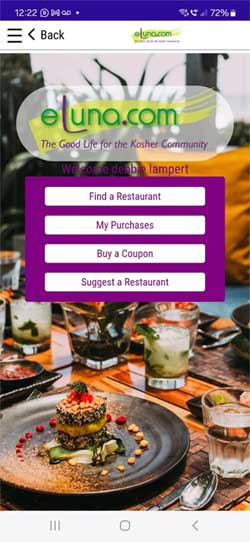
In planning this version we watched the way you work and we designed improvements that will improve your user experience. We have added graphic elements to the app. There are better search facilities and we improved the workflow to avoid pitfalls.
This upgraded version supports new operating system versions. So it should work on all the Android and iOS systems.
In this version we have brought the features that you use most, right up front. Now you can find a restaurant, see the coupons in your purchase bin and buy coupons, all from the Home screen.
In this version you can find a restaurant in new ways:
* Search your current location. The app location finder knows where you are and will find the closest restaurant to your current location. Set the radius to 5, 10 or 20 kilometers from where you are now.
* Search by city. Choose a city and the app will show you all the eLuna restaurants in that city.
* Search by name: type in the name of the restaurant and if it is on eLuna it will come up. Click on the name of the restaurant to open the page.
* ! Search the last restaurants that you viewed. No need to remember where you were last time. The app will remember for you. See the last restaurants that you viewed.
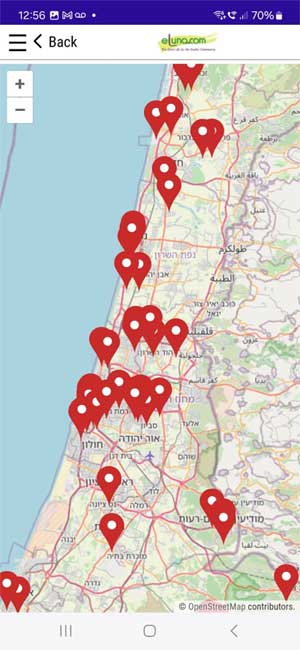 * ! Search the map: This just makes the whole thing easy. Open the map and click on the location of your restaurant. * ! Search the map: This just makes the whole thing easy. Open the map and click on the location of your restaurant.
My Purchases Bin All of the eLuna coupons that you purchase or that are gifted to you are stored in your "My Purchases" bin. Open My Purchases from the app home screen or from the drop-down menu.
The expiration date is shown on the list of coupons. When a coupon expires or is redeemed it will be moved to the list of redeemed coupons and cannot be retrieved.
Redeeming Your Voucher or Coupon: Redeem your voucher or coupon at the restaurant by showing it on your app to the server when you pay your bill.
On the coupons see a button entitled “Submit at Restaurant”. Do not click on this button! When you pay your bill the server at the restaurant must click on this button.
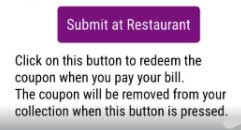 “Are you sure?” A warning will pop up asking you to confirm that you want to redeem the coupon. After seeing the coupon the server should click “Yes.” Your bill will be reduced by the amount or percentage of the coupon. “Are you sure?” A warning will pop up asking you to confirm that you want to redeem the coupon. After seeing the coupon the server should click “Yes.” Your bill will be reduced by the amount or percentage of the coupon.
When the button is pressed the coupon will be removed from your active coupons and will move to the redeemed list in the bin. A message is sent to the restaurant confirming your coupon.
By the way... There is no need to print app coupons. Just show them at the restaurant, the server will press the button and the coupon will be honored.
The eLuna app runs on both Android and iOS mobile platforms.
To install the app open the Playstore on your Android phone or the Appstore on your iOS platform.
Search "eLuna kosher restaurants".
If an older version of the app is already installed on your phone, just update. If you don't see the new version, uninstall your current version and install version 6. You will not lose any of your vouchers or coupons! They will all be just where you left them.
The email address and password that you entered when you registered on app, is your eLuna identification. When you log into the app be sure that you are using these coordinates and not a different email address. If you have logged in with a different email address log out and log in again using the email address used to register.
note: the app requires its own registration. You can use the same password that you use on the website,
If you have forgotten your password you can ask the system to send you the password that you entered when you registered, as it appears in the eLuna database.
If you are no longer using that email address you must change it in this form.
If you do not see your coupons in the My Purchases bin or if you are unable to get coupons, make sure that you are logged in with the email address and password from your registration. Logout and log in again using the coordinates used to register. |